Free PST Viewer Software
Instantly open, preview, and search Outlook PST files — emails, attachments, contacts, calendars, tasks, notes and journals in read-only mode. No MS Outlook installation. No file size limit. 100% offline, 100% safe.
- Opens ANSI & Unicode PST files from Outlook 2021, 2019, 2016 and earlier
- Reads .bak files created by ScanPST.exe
- Handles corrupted / orphaned PST files
- No file size restriction
Quality You Can Depend On Free PST Viewer
Award-winning, high-rated, and privacy-oriented software optimized for top-notch Windows performance
4.9/5 Rating
12,400+ Reviews
Award Winning
Software Suggest Award
100% Clean
SoftPedia Verified
Read-Only & Offline
Your Data Stays Private
Windows Compatible
Windows 11, 10 & Earlier
All You Need To Access PST File
No Outlook installation, no scripts, no danger to your PST file. Just open and read.
Open PST Without Outlook
Access to any PST file in your Outlook account without installing the Microsoft Outlook software.
View All Outlook Items
All elements including emails, calendar, contacts, task, note, journals, and attachments can be accessed under the Outlook tree.
8 Preview Modes
Read the PST files in Normal Mail, HTML, RTF, MIME, Hex, Property, Message Header, and attachment preview modes.
Preview the Attachments
Easily preview the attached files in their original application without extraction.
Quick Scan & Advanced Scan
Use Quick scan when the PST file is healthy while Advanced scan recovers data from very corrupted PST files.
.bak File Support
Access the backup .bak files created by Scanpst.exe of Microsoft without renaming or using any extra tool.
No Size Limit
Easily access files of any size such as 10 GB, 50 GB, or even more than 100 GB without splitting.
Horizontal and Vertical Preview Pane Layout
You can change the preview pane layout horizontal and vertical according to your requirement, similar to Outlook Classic view.
100% Read Only and Offline Access
Original PST file remains untouched and not uploaded anywhere else.
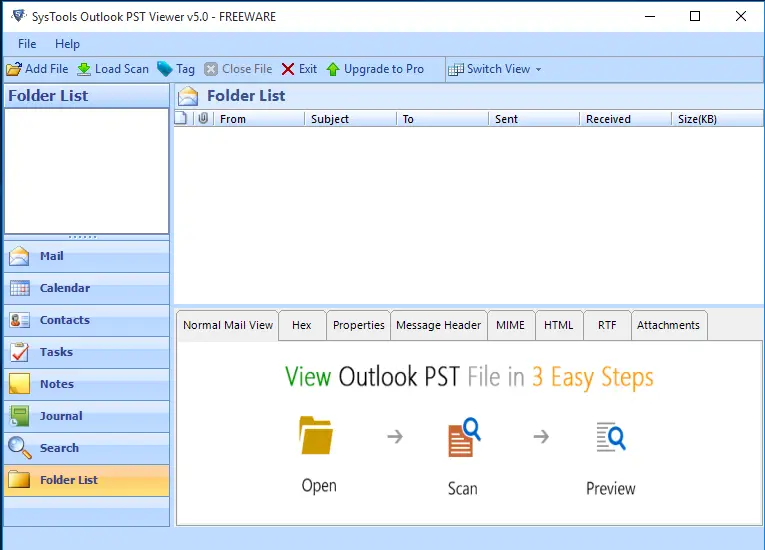
Eight Ways to Inspect or View Every Email
- Normal Mail View: The email exactly as Outlook would render it
- HTML View: Underlying HTML source of the message body
- RTF View: Rich-text formatting layer
- MIME View: Full MIME structure with boundaries and encodings
- Hex View: Raw hex dump - for forensic and eDiscovery review
- Properties View: All MAPI properties and hidden metadata
- Message Header View: Complete SMTP header chain including hops
- Attachment View: Every attachment, listed and openable
Great for legal review, forensic analysis, and IT audits.
Recover Data from Corrupted PST Files
Fast Scan
Quick process for undamaged or slightly corrupted PST files. Mounts the file in seconds.
Advanced Scan
Powerful recovery tool for badly damaged or very large PST files. Restores folder hierarchy, retrieves orphaned elements, previews recovered messages.
Even works when ScanPST.exe doesn’t – opens the .bak file that it leaves behind.
Supported PST Data Items
Every native Outlook item type is fully rendered, with sender, recipient, timestamps, size, and complete metadata visible.
Navigating through Free PST Viewer Software
Open Any PST File in 4 Simple Steps
Free PST Viewer Setup
Install the software and open it. There’s no need for an Outlook profile or Exchange setup.
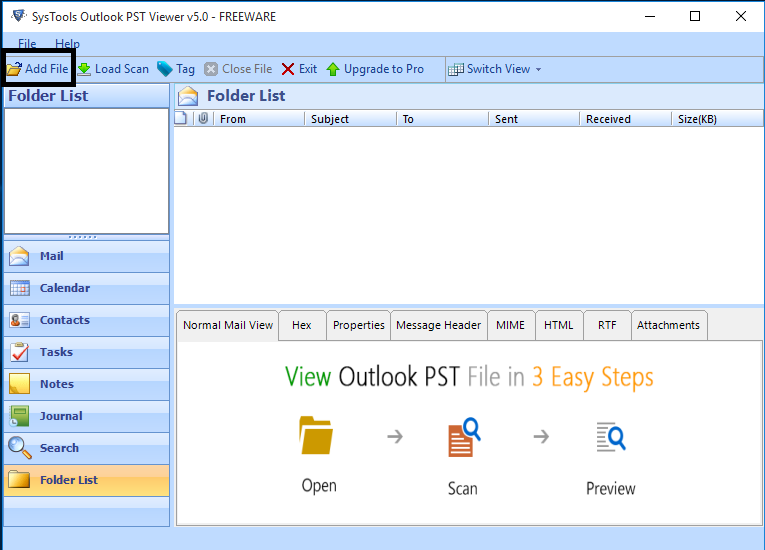
PST File Adding
Use the Add File button and select any .pst or .bak file, or have the software scan your drives automatically.
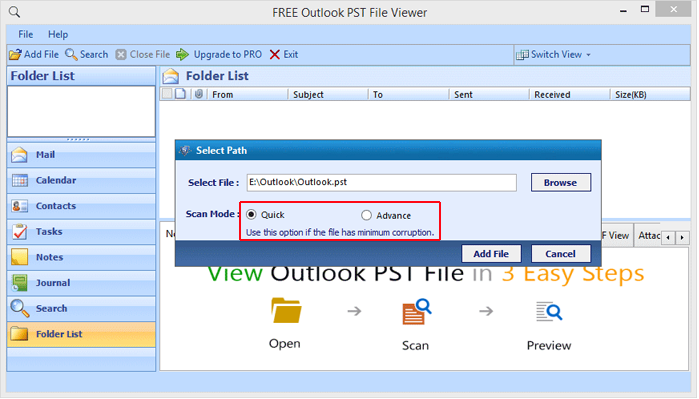
Scanning Mode Selection
Choose the Quick Scan mode for healthy files and the Advanced Scan mode for corrupt files.
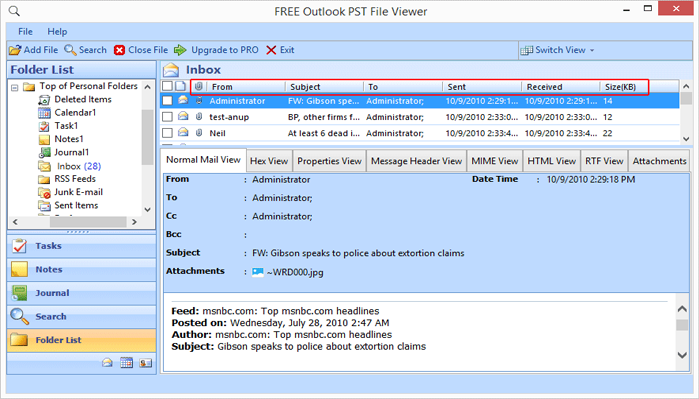
Browsing the Data
View the Outlook-like structure of folders and email messages, attachments, contacts, and calendars through any of 8 view modes.
Know All Features of Premium Plan
Advanced Search
Search in bulk PST files for messages by multiple criteria such as subject, sender, date range, keyword, attachment type.
Export & Save
Export chosen emails to PDF, EML, MSG file format, or a new PST with desired name.
Divide Large PST
Split large PST files into smaller PST files based on size, date, folder or sender.
Curately Designed for Every PST User
IT Admins
Audit mailboxes, verify backup and examine legacy PSTs prior to migration.
Legal & eDiscovery
Examine PSTs in forensically clean read-only mode with all header & MIME information visible.
End Users
Open old Outlook .pst without installing Microsoft Outlook.
Enterprise Teams
Examine PSTs within departments prior to archiving or retirement.
Pick the Right Edition to View PST Files
| Capability |
Free
Basic PST Viewer
|
Pro
Advanced Tool
|
Most Popular
Pro+
Complete Edition
|
|---|---|---|---|
| Open & preview PST (all items) | ✓ | ✓ | ✓ |
| 8 preview modes | ✓ | ✓ | ✓ |
| Scan & repair damaged PST | ✓ | ✓ | ✓ |
| No file-size limit | ✓ | ✓ | ✓ |
| Advanced search | — | ✓ | ✓ |
| Export to PDF | — | ✓ | ✓ |
| Export to EML / MSG | — | ✓ | ✓ |
| Export to new PST | — | — | ✓ |
| Multiple naming conventions | — | — | ✓ |
| PST split option | — | — | ✓ |
| Migrate to Microsoft 365 | — | — | ✓ |
| Price | Free | $69 | $129 |
| Download | Upgrade to Pro | Upgrade to Pro+ |
Supported Outlook Versions & PST Types
Universal Compatibility
- Outlook versions: 2021, 2019, 2016, 2013, 2010, 2007, 2003 and earlier
- PST formats: ANSI (Outlook 97–2002) and Unicode (Outlook 2003+)
- Extensions supported: .pst, .bak (ScanPST output), orphan PST fragments
- Password-protected PSTs: Supported
- Encrypted PSTs: Supported
Operating System
- Windows: 11 (64-bit), 10, 8.1, 8, 7 (32/64-bit); Windows Server 2022, 2019, 2016, 2012 R2, 2008
Supported Source
- ANSI and Unicode Outlook Personal Storage Table (.pst) and .bak
Hardware Requirements
- Intel Pentium 1 GHz (2.4 GHz recommended)
- Processor: 4 GB minimum (8 GB recommended for PSTs over 20 GB)
- RAM: 200 MB for installation + free space equal to the PST size being scanned
Prerequisites
- Administrator rights to install
- MS Outlook installation is NOT required
What's New / Version Highlights
What's New in v5.0
- Faster Advance Scan engine - up to 40% faster with 20 GB+ PST files
- Improved PST decryption capability to decrypt password protected PST files
- Dark mode user interface is now available as an option
- Increased compatibility of the software with Windows 11 24H2
- Bug fixes and localization updates
Trial Version Limitations
Free version will allow you to open and view all items within a PST file indefinitely, without no expiry limits. Upgrade to Pro or Pro+ to unlock advanced search, export, split and migration features.
E-Delivery
Once the payment is done successfully, the Thunderbird Converter Wizard shares a download link and activation key on the registered email ID. Thereafter, a customer can install and launch the solution.
See Why Users Trust Our Free PST Viewer
Verified Security & Performance

Easy Usability Award
Free PST Viewer has been also recognized for its simple and easy-to-use interface that enables users to view and analyze their Outlook PST files easily without any need for technical know-how or learning.

Rated by verified IT professionals
Free PST Viewer was rated highly by verified IT professionals on Capterra due to its reliable performance, accurate previewing of PST files, stable working and overall reliability on Windows platforms.
100% Clean Award
After being certified to be free from viruses, malware, spyware, adware and other malicious elements, Free PST Viewer was given the 100% Clean award by Softpedia. Thereby offering a clean installation experience.
Commonly Asked Questions
Everything you need to know about Free PST Viewer, migrations, licensing, and support.
Free PST Viewer Loved by IT Professionals Worldwide
4.9 / 5 average rating based on 12,400+ verified reviews.
PST Viewer Free allows me to view multiple Outlook PST files without needing to install Outlook on my computer. The user interface is straightforward; the files can be loaded quickly, and it was easy for me to preview the emails, contacts, and their attachments before exporting them.
I often have to analyze archived emails for evidence, and this Free PST Viewer tool made my work very easy. The software maintained the original folder hierarchy, displayed attachments correctly, and let me analyze important emails without any changes to the original files.
It is a very useful tool to analyze both damaged and non-damaged PST files in support cases. Moreover, fast preview, easy navigation make the verification of mailbox content quick prior to performing any recovery or migration operations.
Ready to Open That PST File?
Join 4.7 million professionals who trust Free PST Viewer for safe, offline, read-only access to Outlook data.